Nessie Catalog
Overview
Project Nessie is an open-source transactional data catalog that brings Git-like version control to data lakes. It enables you to manage multiple versions of your data using branches, tags, and commits, similar to how Git manages source code.
With Ilum’s integration, you can leverage Nessie’s version control features directly in your Spark environment. This allows you to branch, tag, and merge data changes safely and efficiently.
Unlike traditional Hive or Glue catalogs, which only track the latest state of each table, Nessie records all changes as commits in a timeline. Each commit represents a consistent snapshot of your data lake. Changes are isolated until committed, ensuring incomplete or in-progress updates are never visible to other users or jobs. Once finalized, changes become atomically visible, guaranteeing consistency.
Key Features: Nessie vs. Traditional Catalogs
| Feature | Traditional Catalogs | Nessie Catalog |
|---|---|---|
| Branching | No | Yes (Git-like) |
| Isolated Environments | Manual/Complex | Simple, via branches |
| Commit History & Time Travel | Limited/Per-table | Full catalog history |
| Multi-table Transactions | No | Yes (atomic commits) |
| Collaboration & Governance | Minimal | Built-in, audit log |
Highlights
- Branching: Create multiple isolated branches (e.g.,
main,dev,staging) without duplicating data. Branches are lightweight pointers to metadata snapshots. - Isolated Environments: Use the same data lake for dev, staging, and prod by isolating changes in branches. No need for separate catalogs or data copies.
- Commit History & Time Travel: Nessie maintains a unified commit log. Inspect, audit, or time-travel to any previous state by commit hash or timestamp.
- Atomic Multi-table Transactions: Commit changes across multiple tables as a single atomic operation. All succeed or none do.
- Collaboration & Governance: Work on separate branches, merge changes, and track who changed what and when. Enables safe experimentation and robust auditability.
Core Concepts
Branches
A branch is an independent line of development for your data catalog.
Branches start as copies of existing branches and track changes separately.
They are lightweight, referencing the same data files but different metadata.
The default branch is usually main.
Tags
A tag is a read-only label pointing to a specific commit.
Use tags to mark stable versions or important milestones (e.g., v1.0, 2025-06-release). Tags are immutable bookmarks.
Commits
A commit is a set of changes recorded as a single atomic unit. Each commit has a unique ID, timestamp, author, and optional message. The commit log provides full catalog versioning.
Using Nessie in Ilum
Nessie is not enabled by default in Ilum. To enable it, see the production page.
Ilum supports Project Nessie as a catalog for version-controlled data management. When using Ilum notebooks or Spark jobs with Apache Iceberg, Git-like operations (branching, merging, tagging) can be performed directly via SQL.
There are two ways to wire Nessie into a cluster: the chart-managed flow, recommended for Helm deployments, and the manual flow, for self-managed Spark images or clusters configured outside the chart.
Nessie SQL operations (USE BRANCH, CREATE BRANCH, MERGE BRANCH, and the rest of the walkthrough below) are supported on both the Spark 3.5 and Spark 4.x image lines. Use the matching ilum/spark:<version>-nessie image, for example ilum/spark:3.5.8-nessie or ilum/spark:4.1.2-nessie. The Spark 4.x image ships nessie-spark-extensions-4.0_2.13, which is ABI-compatible with the Spark 4.1 line (no native 4.1 build is published yet), mirroring the iceberg-spark-runtime-4.0_2.13 it pairs with.
Chart-managed configuration (recommended)
When Ilum is deployed with the Helm chart, the Nessie catalog is configured declaratively. Enable the metastore and set its type to nessie in the ilum-core values (the example uses the umbrella-chart key; in the standalone helm_core chart the same keys live at the top level):
ilum-core:
  metastore:
    enabled: true
    type: nessie
    nessie:
      address: http://ilum-nessie:19120
      warehouseDir: s3a://ilum-data/nessie_catalog/
      s3Endpoint: http://ilum-objectstorage:9000/
      s3PathStyleAccess: true
      ref: main
      catalogName: nessie_catalog
nessie:
  enabled: true
The Iceberg + Nessie catalog wiring — spark.sql.extensions, the SparkCatalog provider, catalog-impl (NessieCatalog), and io-impl (S3FileIO) — is generated by ilum-core under the configured catalogName; it does not need to be set in values. Ilum injects it, together with the connection settings above (URI, ref, warehouse, S3 endpoint, path-style, and region) and the catalog's S3 credentials (taken from the cluster's object-storage credentials, never persisted on the metastore), into every Spark submission on a cluster that has the metastore attached. No catalog wiring, extraJavaOptions, or credentials need to be set on the cluster or in the notebook session — a chart-managed Nessie catalog works out of the box.
With metastore.enabled: true, the bundled default cluster is attached to this metastore automatically, so jobs on it resolve the catalog out of the box. The catalog is addressed by metastore.nessie.catalogName (default nessie_catalog); tables are referenced as nessie_catalog.<schema>.<table> throughout the SQL examples below.
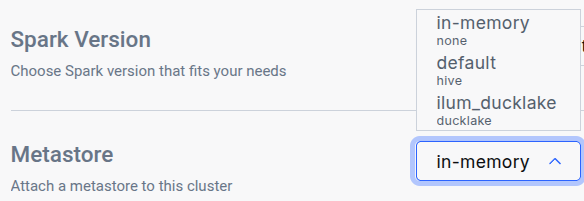
To attach the metastore to another cluster, open its Edit Cluster tab and select Nessie in the General metastore dropdown:
Manual configuration
For a cluster running a self-managed Spark image, or when Nessie is configured outside the chart, the nessie_catalog must be pre-configured in the Spark session.
Make sure the Spark image used in the cluster has the Nessie client installed. In particular, the following are required:
- Iceberg Spark Runtime (
org.apache.iceberg:iceberg-spark-runtime-<SPARK_VERSION>_<SCALA_VERSION>) - Required for Nessie support. - Iceberg AWS Bundle (
org.apache.iceberg:iceberg-aws-bundle) - Required for S3 support. - Nessie SQL Extensions (
org.projectnessie.nessie-integrations:nessie-spark-extensions-<SPARK_VERSION>_<SCALA_VERSION>) - Required for Nessie-specific SQL operations.
Ilum’s custom Spark image for Nessie: ilum/spark:<SPARK_VERSION>-nessie includes all the required dependencies.
When the catalog uri targets the Nessie server's /api/v2 endpoint, also set spark.sql.catalog.<catalogName>.client-api-version=2. The Iceberg-bundled Nessie client otherwise defaults to API v1 and the first catalog call fails with NessieApiCompatibilityException: API version mismatch.
Ilum’s spark-nessie image does not include any Delta table dependencies,
so the default cluster configuration for Delta tables must be removed when using this image
(on a chart deployment, override these via kubernetes.defaultCluster.config).
In particular:
| Name | Value |
|---|---|
spark.sql.catalog.spark_catalog | org.apache.spark.sql.delta.catalog.DeltaCatalog |
spark.sql.extensions | io.delta.sql.DeltaSparkSessionExtension |
Nessie Walkthrough
In the beginning, it is recommended to create anything inside the main branch so that you avoid problems with merging into an empty branch:
CREATE TABLE nessie_catalog.users(
    user_id INT,
    user_name VARCHAR(20)
);
Create a Branch
CREATE BRANCH dev IN nessie_catalog FROM main;
And to verify everything, list all branches and tags:
LIST REFERENCES IN nessie_catalog;
Work on a Branch
Create a table and insert data in the dev branch with the fully qualified name (<TableName>@<BranchName> or <TableName>@<CommitHash>):
CREATE TABLE nessie_catalog.`sales@dev`(
    sale_timestamp CHAR(10),
    sale_amount INT,
    payment_method VARCHAR(20)
);

INSERT INTO nessie_catalog.`sales@dev` VALUES
    ('2025-06-01', 1000, 'Online'),
    ('2025-06-02', 1500, 'InStore'),
    ('2025-06-03', 800, 'Online'),
    ('2025-06-04', 1200, 'Mobile'),
    ('2025-06-05', 950, 'InStore');
SELECT COUNT(*) FROM nessie_catalog.`sales@dev`;
Or use the USE statement to switch a context to a specific branch:
USE BRANCH dev IN nessie_catalog;
SELECT COUNT(*) FROM nessie_catalog.sales;
Because Ilum’s SQL executor treats each query as a stateless entity, using the USE statement requires executing all related statements together.
To do this, select the entire query block in the editor and then press execute.
And show the log of all commits done:
SHOW LOG ON dev IN nessie_catalog;
Merge Branches
MERGE BRANCH dev INTO main IN nessie_catalog;
SHOW TABLES IN nessie_catalog;
If you see an error of No common ancestor in parents of <X> and <Y>, this can mean that the branch you are trying to merge into is empty.
This will cause the merge to fail, even if the branch you are trying to merge was correctly created from the parent branch.
Cataloging Nessie Tables in OpenMetadata
Iceberg tables managed in Nessie can be surfaced in OpenMetadata — Ilum's metadata catalog and governance layer — so that branched, committed, version-controlled tables become discoverable, classifiable, and lineage-connected assets alongside the rest of the data platform.
OpenMetadata reads Nessie through its Iceberg-REST endpoint (base URI http://ilum-nessie:19120/iceberg), cataloging the tables visible on a single reference. The reference is selected by the warehouse (default nessie_catalog → ref main), not by the URI path. Nessie's branch/tag/commit history is flattened — OpenMetadata sees only the current state of that one reference, not the version timeline. The integration is opt-in and enabled with two values:
nessie:
  enabled: true
openmetadataBootstrap:
  services:
    iceberg:
      enabled: true
For the connector details, branch-semantics caveats, object-storage credential note, and full enabling reference, see Iceberg tables via Project Nessie on the OpenMetadata page.
This integration is newly added and opt-in. Its configuration is validated against the chart; the end-to-end result (a Nessie-committed Iceberg table appearing in the OpenMetadata catalog) is pending live verification. Treat it as a preview until confirmed.
Best Practices
- Develop in Isolation: Use branches for development or experiments. Promote changes through a hierarchy (e.g., dev → staging → main).
- Merge Frequently: Merge changes regularly to minimize conflicts.
- Keep Branches Short-Lived: Remove feature branches after merging.
- Avoid Conflicts: Sync your branch with the latest target branch before merging.
- Tag Milestones: Use tags for stable releases or important checkpoints.
- Document Changes: Add commit messages for traceability.
Learn More
For advanced SQL operations and the full Nessie Spark SQL reference, see:
👉 Nessie Spark SQL Reference
Nessie with Ilum combines Spark’s power with Git-like data management, enabling robust “data as code” workflows for your lakehouse.